
Deep-Dive: Creating a Document AI Prototype
Surprisingly simpler than the title suggests

Update: The GenAI landscape has evolved quite rapidly since this post. There still could be some helpful info, but kindly take everything below with a grain of salt.
Large Language Models (LLMs) like ChatGPT have now significantly lowered the bar for creating AI prototypes. I can only express appreciation for the meteoric rise of frameworks and communities aimed at helping our AI journey from ground zero all the way to production. As someone who’s been a bit behind the curve, I’ll share my journey of utilizing the popular framework LlamaIndex to get a roughly scalable Document AI prototype to work.
Some Background
Let’s talk about the Document AI problem space. Most of us find digging through vast collections of Confluence, Jira, and document spaces to be painful, especially when we’re just trying to quickly get up to speed on something. At my previous company, perhaps the biggest challenge our product teams faced was digging through fragmented sources of legacy documentation just to understand how to sunset our legacy products. Fortunately, we’re seeing a major trend in the workplace:
Earlier this year, Atlassian announced its GenAI-assistant Atlassian Intelligence, enabling users to write simple questions and get quick answers across a company’s entire Confluence/JIRA space
Just this month, Zoom announced its AI companion product, allowing users to easily take meeting recordings/transcripts and find the information they need
There’s the big GenAI race between Microsoft and Google to create the most value out of their docs, spreadsheets, and mainstream workplace offerings
Finally, most companies are considering building their own GenAI products to help make work tasks easier and faster
This is great. And with companies prioritizing AI security and privacy, many of us can feel a bit reassured that this is a promising trend.
However, this begs the question: With the 10+ GenAI assistants we’ll eventually have to keep track of, why can’t we just have one simple tool to do everything? Most of us will reach a point where we get fed up with each company’s new AI platform; we’ll just want to get our jobs done. This will certainly be an interesting problem for companies to solve, as we’re already seeing GenAI assistants becoming fragmented.
We don’t know what will eventually happen once everything stabilizes, but we can start experimenting with prototypes to see what’s initially possible.
Prototype Overview
The goal of our prototype today is simple. We want it to take in a bunch of uploaded documents and answer any questions about them. And if it shows promise, we can eventually scale it to unify inputs from all data sources (databases, APIs, spaces) and query multiple GenAI products to create the best output. The prototype—in its roughest fashion—will look something like this:
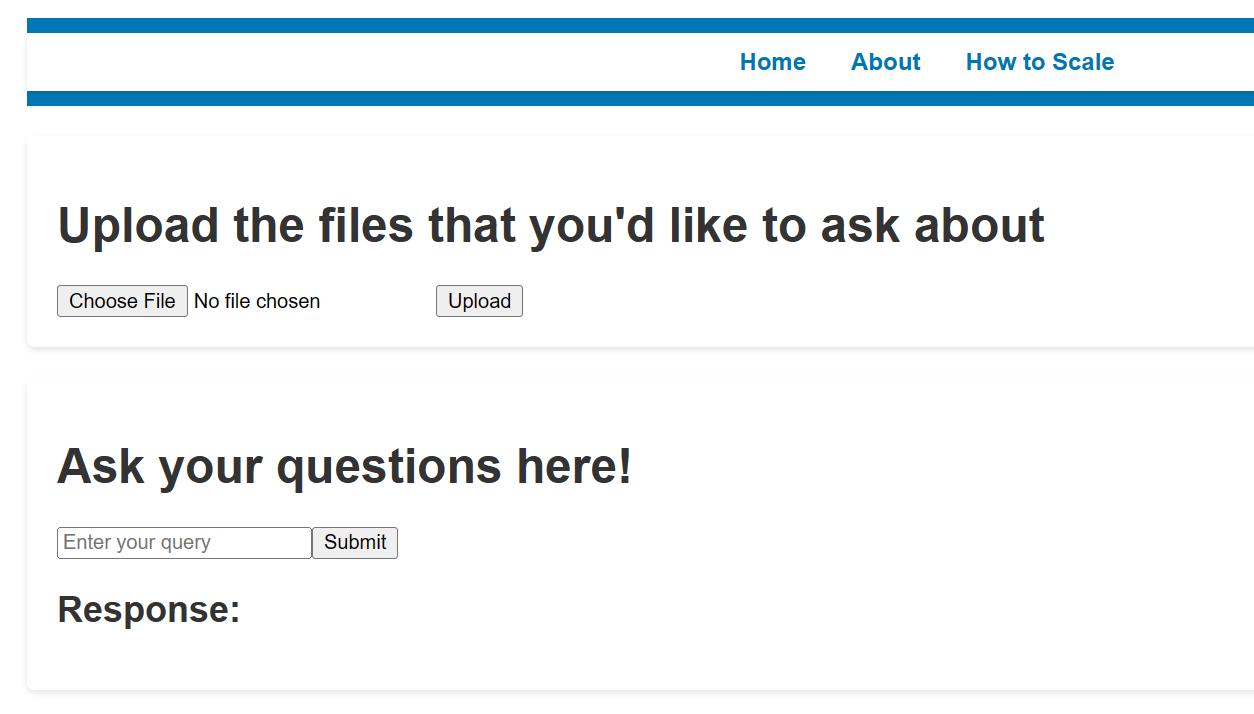
If asked how two uploaded files about earnings compare, it will analyze both documents to give me an acceptable answer.
As you might have guessed, building this from scratch can take a ton of effort:
We first need it to process uploaded documents and make sense of them, regardless of whether they are text, PDF, or doc files.
It then needs to store the files and prepare the contents to be LLM-ready.
It will then need to work together with an LLM to provide the best answer. If we want to reasonably answer any questions about one or all of the documents uploaded together, the prototype will need to provide the best context possible.
Fortunately, with the help of some popular frameworks and tools, I found this task to be surprisingly reasonable. I’ll be using Llamaindex’s framework, which will reduce the backend code we must write by 7-10x. Some platforms like Mockitt may not even require a single line of code to get it up and running.
We’ll build this prototype starting with the backend infrastructure, utilizing Llamaindex as the backend to ingest, structure, and access our files. We’ll then use Flask’s API Server framework and a rough react frontend to tie everything together.
First Step: Processing and Storing the Documents
The first step is to take all of our uploaded documents and store the text in a way that can easily be read by an LLM. Llamaindex can help us accomplish this using 4 major lines of code:
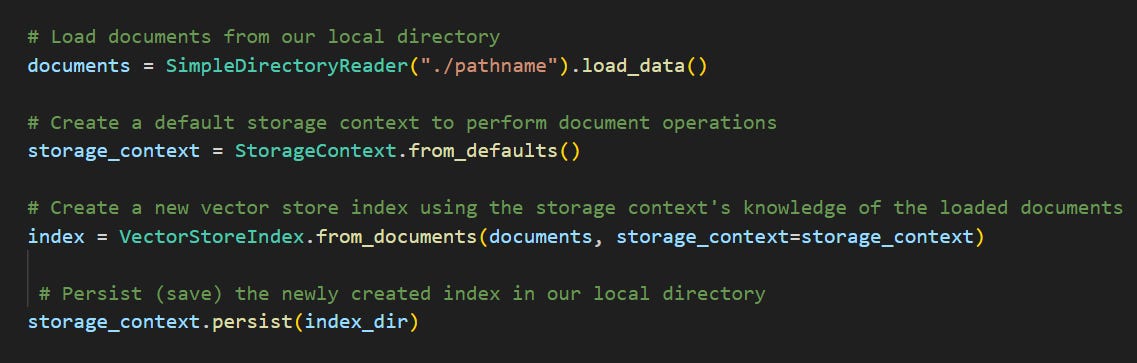
Let’s digest what each of Llamaindex’s classes (shown in teal above) do:
SimpleDirectoryReader is able to locate documents from a specified directory and read their contents
StorageContext is like a router that performs document operations by knowing where and how each document is stored
Finally, we use VectorStoreIndex to create indexes out of our documents. First, it breaks the document into small chunks of text as nodes. An example of a node could be [“the earnings were $200 million”]. These nodes are then translated into embeddings, which are numerical matrices for LLMs to understand easily. Finally, it stores the nodes and their embeddings into indexes, shown below:
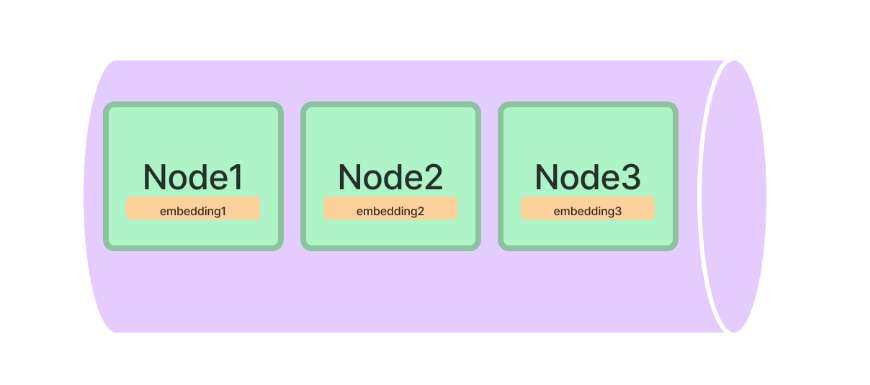
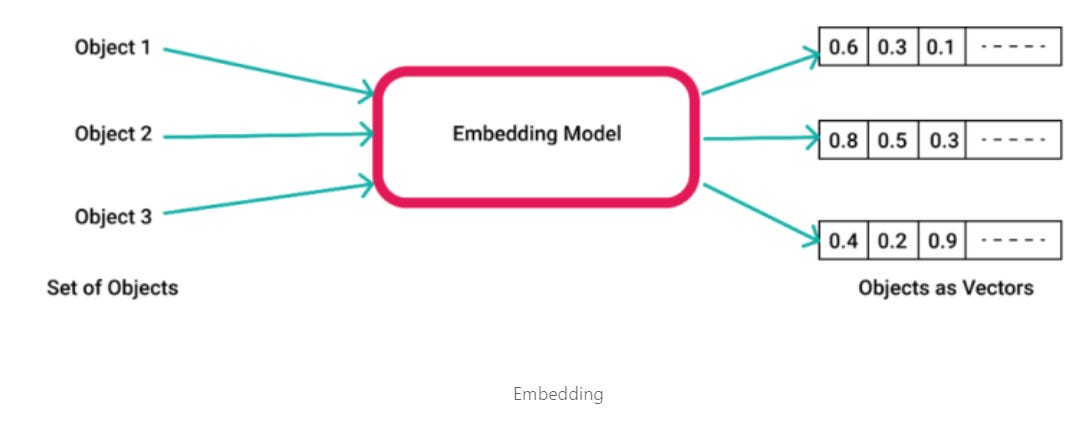
This brings up the question: why exactly do we need to embed our text? In order for our prototype to create the most accurate answer, it needs to organize all the document data in a way that can easily be used with LLMs. The way LLMs and modern text summarization models train is by learning from a ton of multi-dimensional vectors. Translating the text to vectors allows Llamaindex to best organize and communicate with other LLMs. Fortunately, our VectorStoreIndex class above acts as an embedding model that can translate text into numerical vectors.
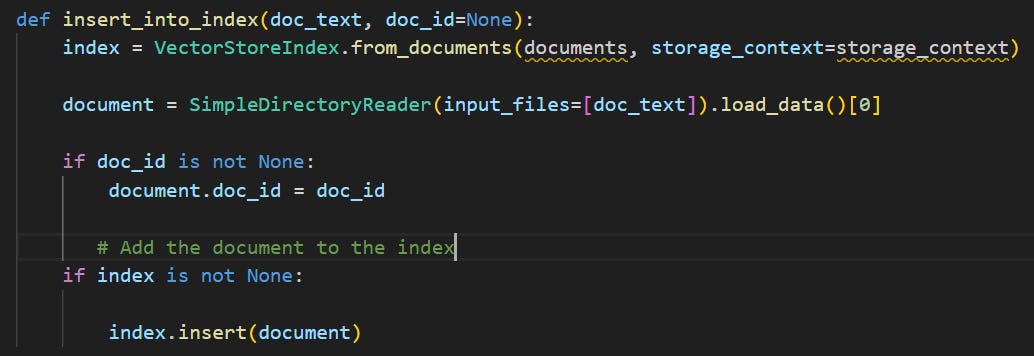
Tying it all together, we can define a simple, re-usable function called insert_into_index() that will take any uploaded document and prepare for its contents to be read by the LLM. It’ll look somewhat like the below:
Second Step: Querying
So now that the infrastructure is in place, we want to make the prototype answer a question. First, we’ll need to use an API Server framework like Flask to take in our query text. Setting up Flask looks something like this:
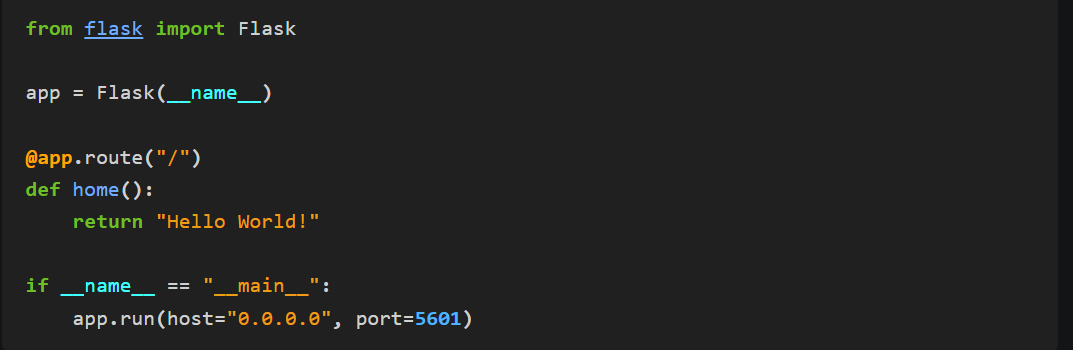
The convenient thing about Flask is that the @app.route() function takes in whatever is passed from the front end and connects it with our existing backend infrastructure. If we run the snippet of code above, since we are defining what happens if nothing is passed, it’ll return a ‘Hello world!’ default.
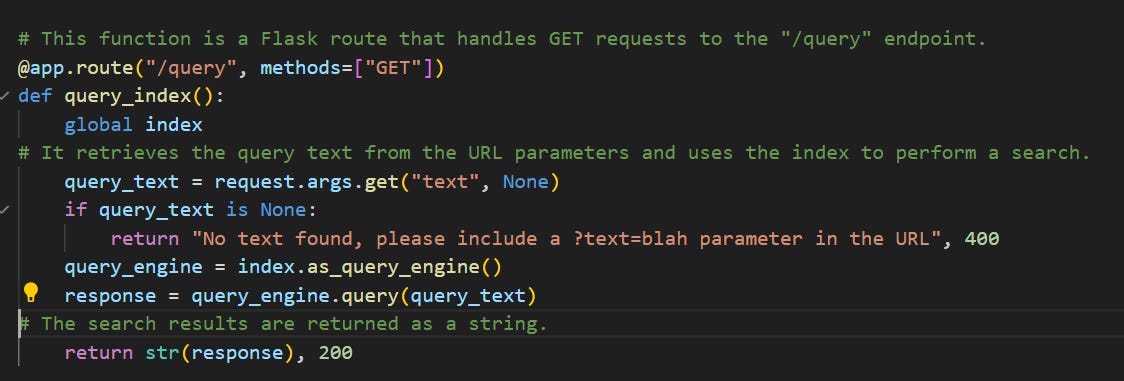
From the backend, taking our query and generating a response consists of these three lines of code:

Using Llamaindex’s VectorStoreIndex class, the query engine takes the query (What did the author do growing up?) and combines it with context from all our uploaded documents to communicate with the LLM. This is essentially how Retrieval-augmented generation (RAG) works, by integrating custom contextual information with the query for an optimal answer. The diagram below explains RAG pretty well:
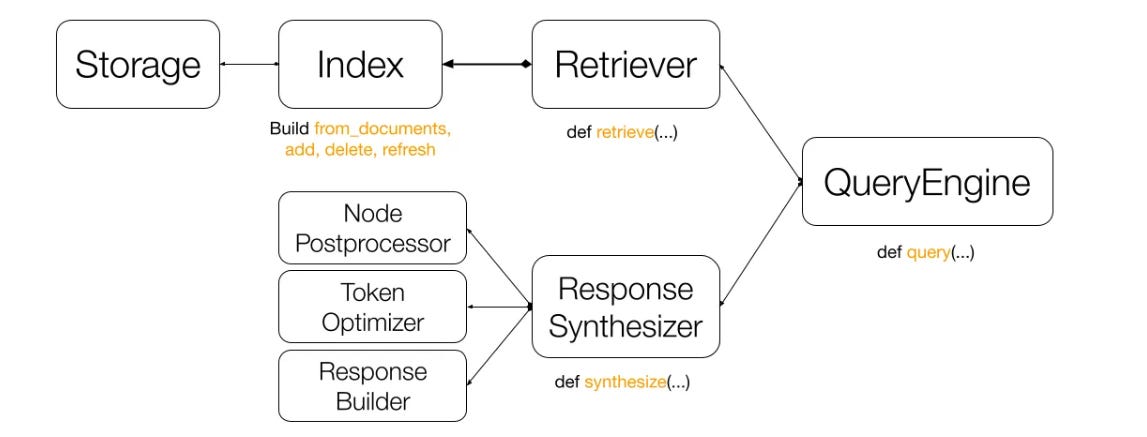
The main components involved are:
Retriever: It fetches relevant nodes (text blocks) from our document based on the indexes created
Response synthesizer: Used for further optimization at scale, by controlling processing and tokenizing parameters to achieve the best performance
QueryEngine: Ties everything together and submits the query to the LLM
Utilizing our LLamaindex and Flask building blocks above, we arrive at something like the query function below that allows the prototype to answer our question:
Third Step: Tying it together with a Front-End
Now that the backend and API server are set up, we just need a roughly scalable front-end to bring everything together. Its main goals are to (1) handle file uploads and (2) take in our questions.
Although React is a common choice, any front-end library that integrates well with Flask will do. To handle file uploads, we can use an API call to send any file as an object:
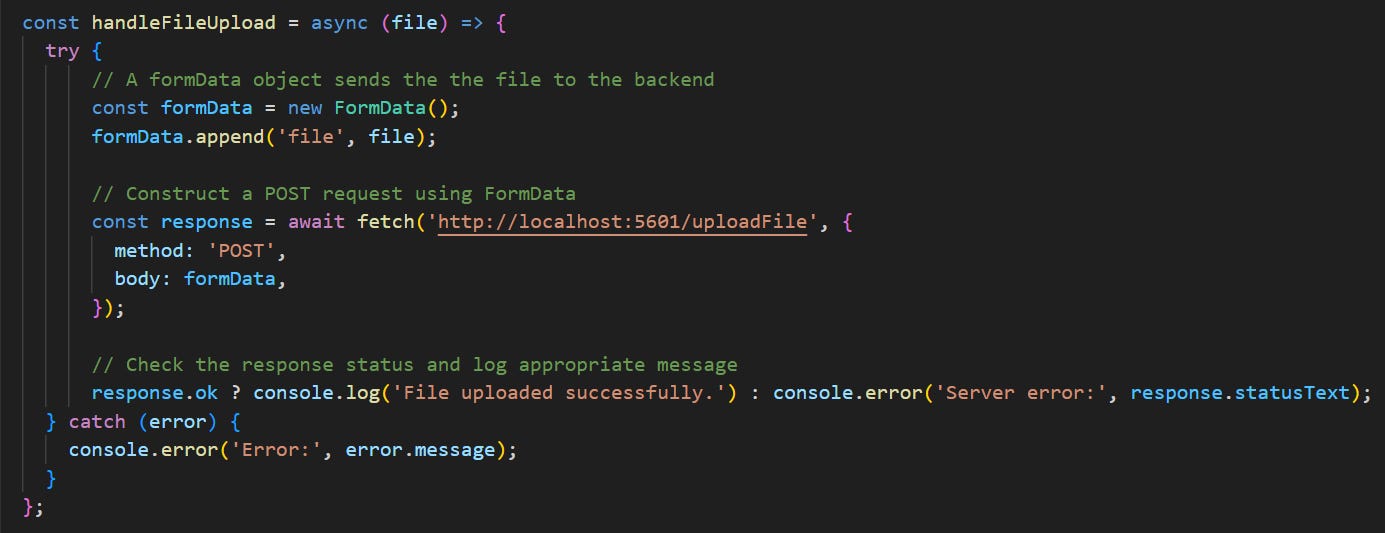
After combining our file upload functionality with a basic question component, we get a roughly working prototype! The main advantage of using React, Flask, and LlamaIndex is that all three technologies can be scaled to accommodate larger data sources of all types. Llama Hub seems to support over 100+ different types of data connectors, so it’s possible to integrate almost every data source to produce the highest-quality answers.
Conclusion
This concludes our attempt at building a document AI prototype. I don’t believe it’s going to be long before everyone can build 0-1 prototypes in a matter of hours. Thanks for reading, and if it is of interest, here are two further points of exploration that I recommend:
Breadth: Building blocks of Generative AI - an overview of the GenAI tech stack and recommendations on how to choose the right technology per use case
Depth: Let’s build GPT - perhaps the most informative deep-dive into the transformer architecture behind LLMs. Opening the video’s Colab notebook and running anything I didn’t understand through an LLM (GPT, Bard) helped me immensely.